Appearance of the levels
The appearance of the levels takes shape in this:
- Level badge: the visual representation of the level
- Name: an optional name for the level
- Description: an optional description for the level
- Points symbol: the meaning given to points for all levels
Using the appearance effectively can help create a more immersive and engaging gamification experience. We highly recommend tweaking the appearance when learners have already been exposed to it in previous courses or trainings.
The term "badge" can be confused with Moodle built-in badges. In XP, a level badge is a visual representation of a level, and not a collectible. To award a Moodle badge when a level is attained, see this page.
Level badge
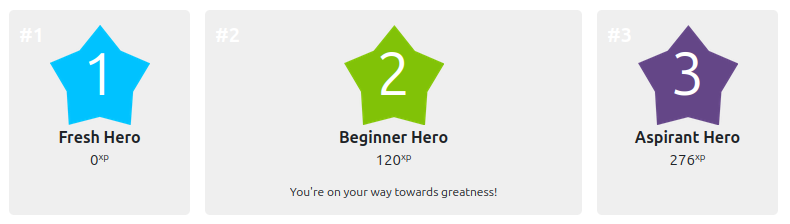
The "level badge" defines the visual appearance of the level. By default, XP displays levels as their number within a star shape of varying colours. With XP+, one of the built-in themes can be selected to display different designs.
To manually customise the appearance of the levels, from XP settings, navigate to Levels > Appearance and upload your own images. The uploaded images must be named after the level number (1.png, 2.jpg, etc.). The images must be in either GIF, JPEG, PNG, or SVG formats. We recommend the size and ratio of 100x100 pixels.
When using both a theme and uploaded images, the uploaded images will take precedence.
Name & description
The name of a level is displayed on the information page, and on the notification popup when a learner has attained a new level. Level names are useful to further customise the gamification experience by making the levels more enticing, rewarding, meaningful or plainly playful.
The description of a level is displayed on the information page. It is a useful way to provide additional context, such as an encouraging message, or a hint about something the learner may gain from reaching the level.
Points symbol
By default, the points are symbolised as XP, short for "Experience Points". This can be changed to any other symbol to carry a meaning associated with your particular gamification experience.
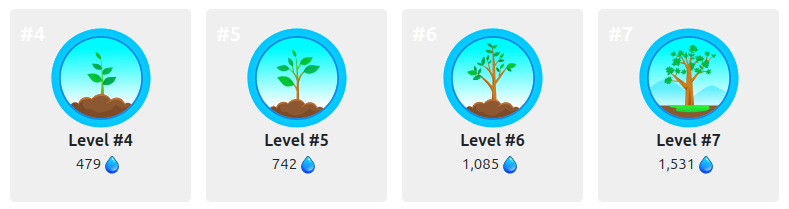
Bringing the theme of the level badges and the points symbol together can help create a more cohesive and engaging gamification experience. For example, when using a seed growing into a tree as the level badges, and a water droplet as the points symbol, a learner would earn droplets of water leading them to witness their tree (level) grow.
From XP settings, navigate to Levels > Appearance and change the "XP points symbol" to your desired symbol. The points symbol can be selected from a dropdown of built-in symbols, or an uploaded image. When uploading an image, it must be in either JPEG, PNG or SVG format with the recommended height of 18px.