Award badges
This feature requires Level Up XP+.
You may elect to award a Moodle badge to a learner when they attain a level.
Moodle badges are not the same as the level badges. A Moodle badge is a collectible, while a level badge is a visual representation of a level.
Prerequisites
- The Moodle admin setting
enablebadgesmust be enabled. - Managers must have both permissions
moodle/badges:viewbadgesandmoodle/badges:awardbadge. - Students must have the permission
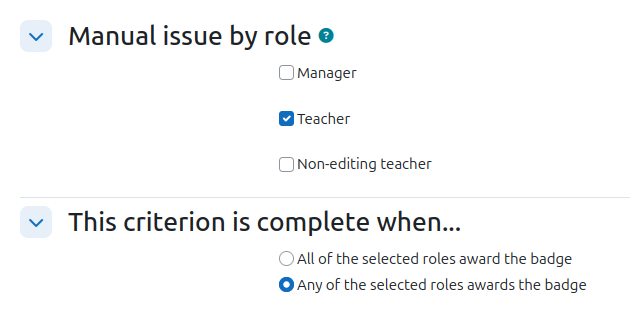
moodle/badges:earnbadgeto receive the badge. - Badges must use the criteria "Manually issued by role" (see below).
Choosing a badge
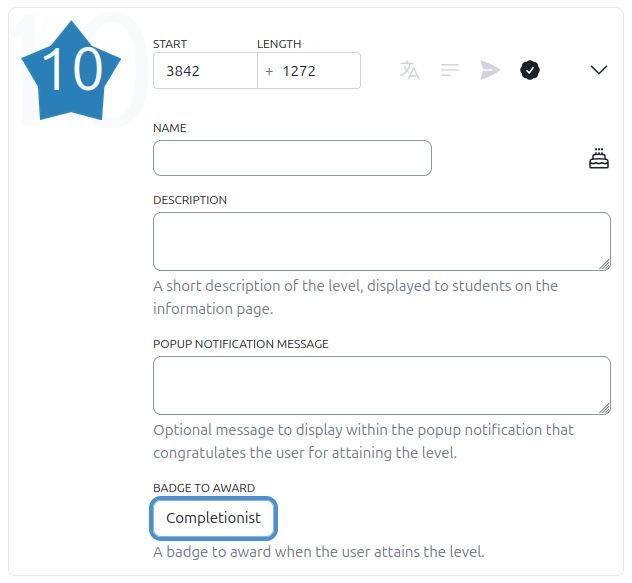
From XP settings, navigate to Levels > Setup. To select a badge, expand the level and choose a badge from the dropdown. Not every badge is compatible with XP, see below for how to create compatible badges.
When set, whenever the level is attained, the badge will be awarded to the learner. Note that this setting is not retroactive. If a learner has already attained a level, the badge will not be awarded to them automatically.
Creating compatible badges
Badges that can be awarded from XP must be created with a few requirements in mind.
- The criteria "Manually issued by role" must be used on its own, not combined with other criteria.
- Access to the badge must be enabled.
When a badge has been configured correctly and you have the required permissions, it will be available in the level settings.