Learners are not earning points
If a learner is not receiving points when you expect them to, work through the checks below in order. In most cases, the problem is related to settings, permissions, or how the rules are configured.
1. Check points gain setting
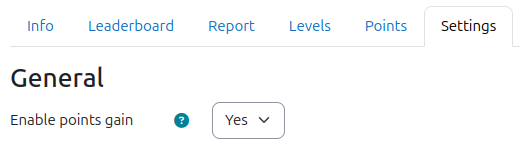
Points are only awarded when points gain is enabled. Navigate to the XP settings and confirm that Enable points gain is turned on. This setting enables and disables itself automatically when the XP block is added to or removed from a course.
2. Check permissions
The learner must have the permission block/xp:earnxp where the action occurs. Actions performed by users who do not have the permission are ignored. Actions performed by administrators are always ignored unless explicitly enabled in the admin settings.
To check a user's permissions:
- Navigate to the "Check permissions" page.
- In a course, find the page from the Participants page.
- In an activity, find the page from the activity navigation.
- Select the learner.
- Enter the permission name
block/xp:earnxpin the filter field. - Confirm that "Allowed" is set to "Yes" for the permission.
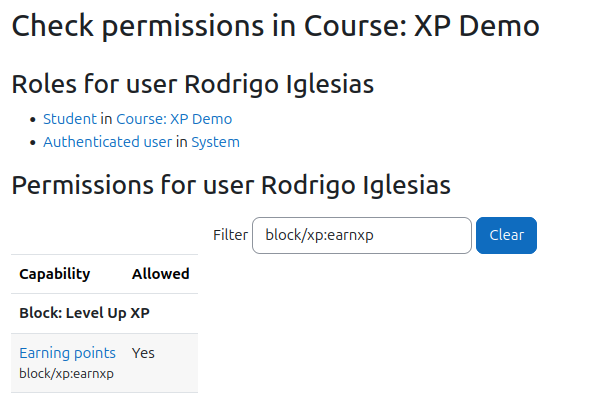
If "Allowed" is set to "No", confirm that the user has the expected roles, and that those roles allow the permission.
- Moodle documentation: Check permissions
- Moodle documentation: Roles and permissions
- Moodle documentation: Assigning a role
3. Check the logs
Confirm that the event related to the action is visible in the Moodle logs. This helps confirm the behaviour of Moodle, or the plugin emitting the event. In most cases, without an event, XP is unable to detect the action and award points accordingly.
If the event is present in Moodle logs, check whether the action appears in the XP logs (from the report page). If it does with zero points, it signifies that a rule was incorrectly set, or that the learner has reached the maximum number of points that they can earn for this action or for a given time frame.
4. Check the rules
Confirm that the rules have been configured correctly by referring to their specific documentation page. See Points system.