Action limits
Limits control how many times an action can award points. Sensible defaults are already in place, so repetitive or low-effort actions do not earn unlimited points out of the box. With XP+, those limits can be configured for each rule to match the expectations of your course.
How limits work
When you create an action rule, you can add one or more conditions to target specific activities. For example, a rule for posting in a forum could target any forum, forums with a specific tag, or one particular forum. Each condition gets its own limit.
Conditions are evaluated in order, from the most specific to the most general. When a learner performs an action, XP finds the first matching condition and checks its limit. If the limit has been reached, no points are awarded for that action, regardless of whether a more general condition further down might still have room.
The two types of limits
Each condition supports an overall limit. Depending on the action type and condition, a repetition limit may also be available.
Overall limit
This sets the maximum number of times a condition can award points within a given time frame. The available time frames are: hour, day, week, month, and in total.
Using a time frame such as day or week resets the count at the start of each new period. Using in total means the limit applies permanently: once the condition has awarded points the configured number of times, it will never award points again, regardless of when.
For example, setting an overall limit of 5 times per day means a learner will only earn points for the first 5 matching actions in that day. Setting it to 1 time in total means the condition can only ever give points once, for the lifetime of the course.
Repetition limit
Some action types also support a repetition limit. This controls how often the same specific item can give points within a time frame. The same time frames are available: hour, day, week, month, and forever.
Using forever means a particular item can only contribute points once, permanently. A repetition limit of once per discussion forever means that each forum discussion can only ever give points to a learner once, no matter how many times they return to it.
To illustrate, imagine a rule that awards points for replying to forum discussions, with an overall limit of 5 times per day. Without a repetition limit, a learner could reply to the same discussion 5 times and collect all 5 rewards. With a repetition limit of once per discussion per day, each discussion can only contribute points once per day, and the learner would need to reply to 5 different discussions to earn the full daily allowance.
This is a powerful way to encourage breadth of participation rather than repetition in the same place.
Examples
Forum participation
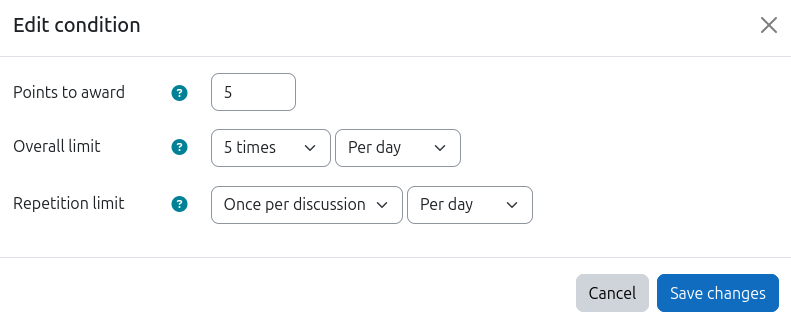
A rule awards points for replying to forum discussions.
- Overall limit: 5 times per day
- Repetition limit: once per discussion per day
With this setup, a learner can earn points for up to 5 replies per day, but each discussion can only count once per day. To earn the full 5 rewards, they need to engage with 5 different discussions.
Self-assessment quiz
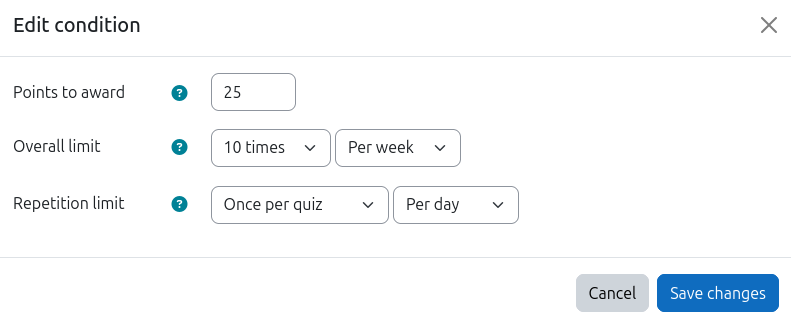
A rule awards points for attempting a quiz that learners can retake freely.
- Overall limit: 10 times per week
- Repetition limit: once per quiz per day
With this setup, a learner can earn points for up to 10 attempts per week, but no more than once per day for the same quiz. Whether they complete all 10 attempts in a single day or spread them out does not matter as long as they stay within the daily and weekly caps.
Good to know
- If either limit is reached, no points are awarded. It does not matter whether the other limit still has room.
- When the limit is reached, the action is silently ignored. Learners are not notified, and nothing is added to the logs.
- The time frames reset at the start of the period. For example, a daily limit resets at midnight (server time).