Action rules
Action rules are the recommended way to award points for things learners do in Moodle. They replace the older event rules, offering a simpler and more flexible setup.
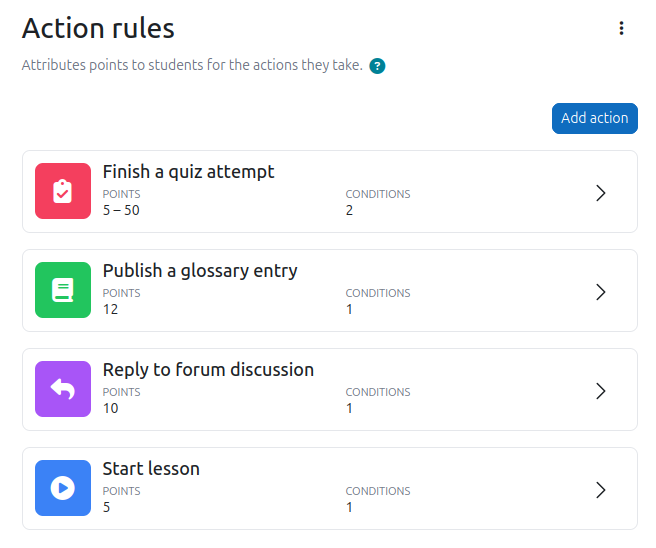
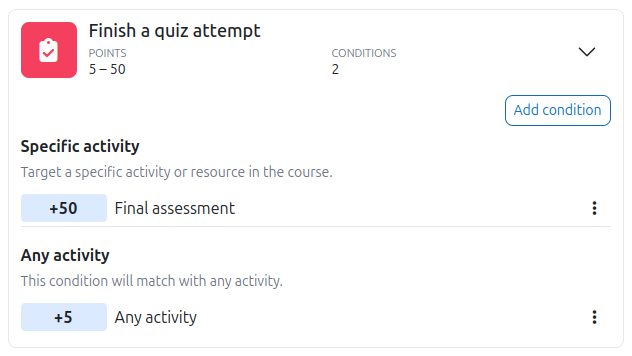
Each rule targets a specific type of action, such as posting in a forum, viewing a resource, or obtaining a certificate. Within a rule, you add conditions to define where the rule applies and how many points to award. The conditions are evaluated from top to bottom, and the first one that matches gives its points. You do not have to worry about ordering the conditions, XP does that for you.
Setting a condition to 0 points is a valid way to exclude certain activities from giving any points at all.
To award points for completing activities, sections, or courses, use the completion rules instead.
Structure of a rule
A rule is made up of:
- An action type: the kind of action being performed, such as viewing content, writing content, or obtaining a certificate.
- One or more conditions: each condition defines where the rule applies and how many points to award.
- Optional limits: controls on how often a condition can give points. Learn more
Default rules
When XP is installed, two rules are already in place: one for viewing content and one for writing content. These cover a broad range of common actions and allow learners to start earning points immediately, without any configuration.
Most educators will eventually replace or refine these with rules that better reflect the goals of their course.
Action types
Here is are some of the action types available.
| Action type | Description |
|---|---|
| View and write content | Broad defaults covering content consumption and creation. |
| Answer feedback questions | When the learner answers questions in a feedback activity. |
| Create a database entry | When a learner creates a new entry in a database activity. |
| Create a forum discussion | When a learner creates a new discussion in a forum. |
| Finish a quiz attempt | When a learner finishes a quiz attempt. |
| Obtain a certificate | When a learner is issued a certificate by the Custom certificate plugin. |
| Publish a glossary entry | When a learner's glossary entry is published. |
| Reach end of lesson | When a learner reaches the end of a lesson activity. |
| Read assignment feedback | When a learner reads the feedback on their assignment submission. |
| Read a book chapter | When a learner opens a chapter in a book activity. |
| Read a forum discussion | When a learner views a discussion in a forum. |
| Reply to a forum discussion | When a learner posts a response to a forum discussion. |
| Start a lesson | When a learner starts a lesson activity. |
| Start a quiz attempt | When a learner starts a quiz attempt. |
| Submit an assignment | When a learner submits an assignment. |
| View an activity | When a learner accesses a page in an activity. |
| View the course page | When a learner accesses the course page. |
| View lesson content | When a learner views a page in a lesson activity. |
Condition types
Conditions define where a rule applies. The condition types available for a rule depend on its action type.
| Condition type | Description |
|---|---|
| Specific activity | Targets actions in one specific activity or resource. |
| Activity name | Matches actions in activities whose name meets the configured criteria. |
| Activity tag | Matches actions in activities that have a specific tag applied to them. |
| Specific section | Targets actions in one specific section in the course. |
| Course | Targets actions in a specific course. |
| Any... | Catch-all that matches anything of a given type. |
When points are not awarded
It can be helpful to understand the cases where points will not be given, especially when troubleshooting.
The user does not have the permission to earn points. Only users with the block/xp:earnxp capability will earn points. By default, this is granted to the student role. Guests and unauthenticated users never earn points. Administrators do not earn points unless explicitly enabled in the admin settings.
The action happened outside of a course or activity. Actions that occur outside of a course or module context are ignored.
The action is flagged as anonymous. Some Moodle activities, such as anonymous feedback, flag their events as anonymous. Those are always ignored.
A condition limit has been reached. If a matching condition has an limit that has been exhausted, no points are awarded for that action, even if the action would otherwise qualify.
No rule matches. If no condition in any rule matches the action, nothing is awarded.
Good to know
- Action rules only apply going forward. Actions performed before a rule was created will not earn points. Learn more