View and write content
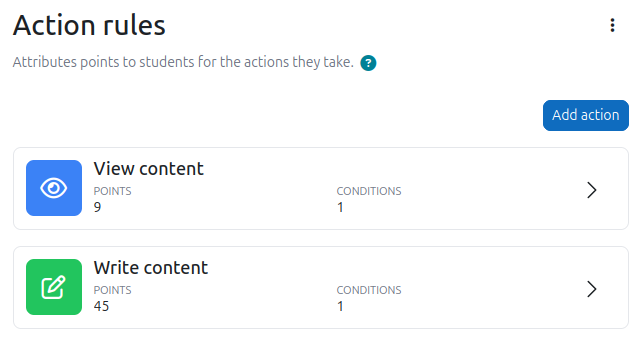
When XP is installed, it comes pre-configured with two ready-to-use rules: one for View content and one for Write content. Learners start earning points immediately.
- View content: awarded when a learner reads or views course material, such as opening a resource or reading a forum discussion. The default is 9 points.
- Write content: awarded when a learner creates or submits something, such as posting in a forum or submitting an assignment. The default is 45 points.
They work by observing the events that Moodle broadcasts as learners interact with their course, and XP uses those events to infer whether content is being consumed or produced. This means most common learning activities are covered out of the box, without any setup required from educators.
Built-in limits
To prevent abuse, both action types come with built-in limits.
- View content is limited to once per hour per piece of content. For example, if a learner views the same page or forum discussion multiple times, points will only be awarded once per hour for that specific piece of content.
- Write content is limited to 10 times per hour. The first 10 submissions in a given hour will earn points. Anything beyond that will not.
These defaults can be adjusted in XP+ using the action limits feature.
There is also a built-in spam prevention system that discards rapid bursts of actions. If a learner triggers an unusually high number of actions in a very short period of time, such as clicking through many forum posts in quick succession, those excess actions will be silently ignored. This protection applies to both view and write actions and cannot be configured from the UI.
Going further
Over time, most educators find they want more control, such as excluding certain activities from giving points, giving more weight to meaningful actions like submitting an assignment, or switching to completion-based rules altogether. The Action rules page is where you can add, adjust, or remove rules to match what actually matters in your course.
Good to know
- Because the classification of actions is based on Moodle's internal events, it is not always exact. XP does its best to determine whether an action is meaningful, but some edge cases may occasionally slip through or be excluded.